Shariiing Review is the ideal tool for viewing your 3D models and mockups in a fully immersive environment.
While traditional tools can be cumbersome and hinder usability, Shariiing Review prioritizes an intuitive user experience so you can focus on what matters most: understanding, deciding, and collaborating.

The Shariiing Review app lets you easily view your 3D files in GLB/GLTF format and instantly dive into your projects at actual scale, without any complexity or friction.
In this immersive environment, every element becomes clear and manipulable. You can explore your models down to the finest details while preserving their complete structure. Annotations and highlights facilitate communication, speed up approvals, and make project reviews more efficient and engaging.
For more advanced environments, Shariiing Review integrates seamlessly with Shariiing Advanced, allowing you to import CAD data directly while maintaining a smooth and accessible experience.
Shariiing Review is an immersive experience designed to simplify complexity and put the user back at the heart of the decision-making process.
A wide range of applications: from industry to education
Shariiing Review is suitable for any industry that requires immersive 3D visualization:
- Manufacturing: validate models, share instructions, and identify issues before production.
- Smart Cities: immerse yourself in a 3D model to understand the specifics of an urban environment, plan developments, or preview architectural designs.
- Training: facilitate learning through the use of 3D models and project reviews in professional settings.
More broadly, any professional who works with complex 3D models can rely on Shariiing Review for model reviews, CAD design reviews, or project collaboratio
A simple and intuitive immersive experience
Shariiing Review is designed to be simple, intuitive, and accessible to everyone. The goal is to make it easier to understand and discuss 3D models without modifying them.
So, in your headset, you can:
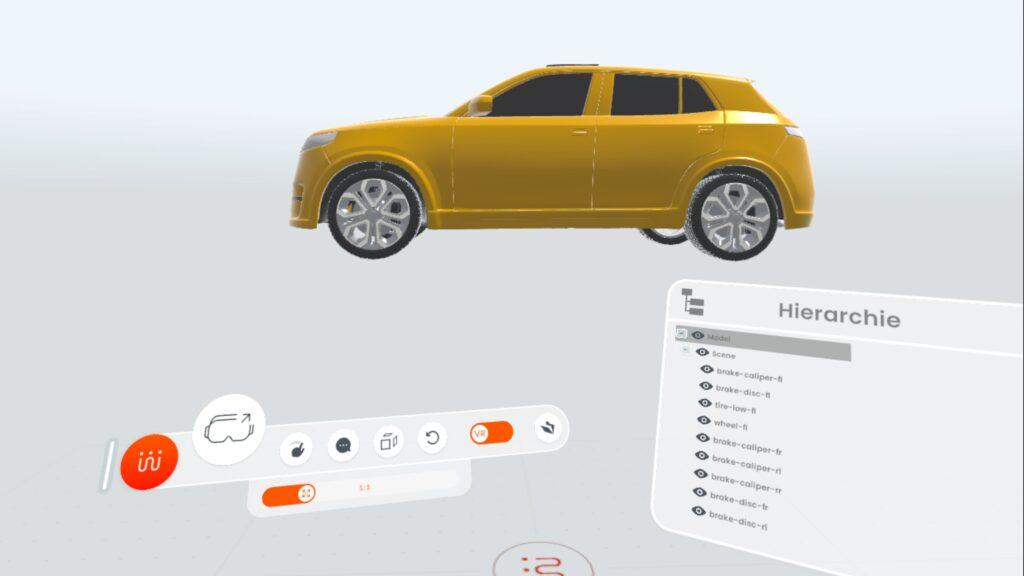
- Change the model’s scale (scaled down or 1:1 scale)
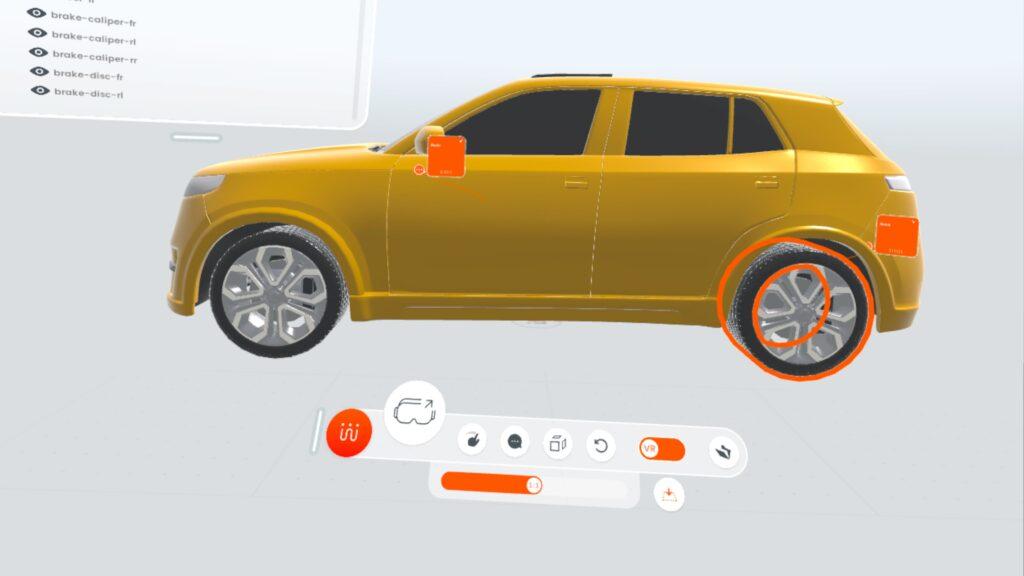
- Precisely point to elements of the model using temporary annotations
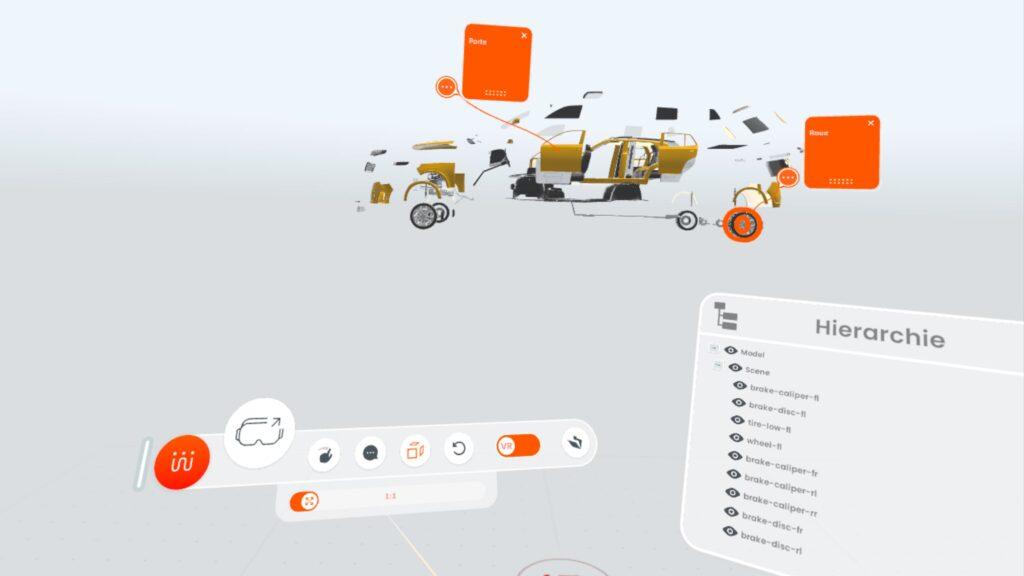
- Explode the 3D model to reveal the internal layout and make all parts visible.
- Place the object on the ground for a better view
- Add notes
- Grab, move, and view parts from all angles
- Access the complete CAD model tree and select, hide, or show parts
Interaction with Shariiing Advanced:
- Share what you see with the entire audience with a single click, allowing them to interact with you
Access all 3D models in the Shariiing Advanced session you are connected to.
Wide hardware and software compatibility
In terms of hardware, Shariiing Review is compatible with all virtual, augmented, and mixed reality headsets, whether wired or standalone.
Another feature you’ll really appreciate: Shariiing Review supports remote rendering. This means that even your most complex—and therefore resource-intensive—models can be viewed in your standalone headset. And that’s a real added value!
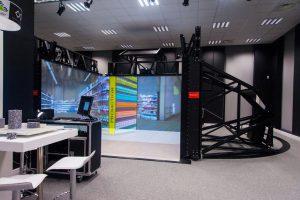
You can also use it with immersive devices such as CAVEs or Powerwalls.
And when it comes to file formats, it’s simple. Shariiing Review natively supports .glb files.
Shariiing Advanced: Unlock the Full Potential of Shariiing Review

When used with Shariiing Advanced, Shariiing Review greatly expands collaboration possibilities. All annotations made in Shariiing Review are visible in the headset or immersive system being used and are synchronized with Shariiing Advanced.
The 3D models from a Shariiing Advanced session are automatically integrated into the headset via the shared library, enabling seamless collaboration.
No headset? No problem: participants can view the model and add annotations in real time using Shariiing Advanced.
This integration offers more precise collaborative review, simplified model sharing, and optimal interaction among all users, regardless of their hardware.
It also supports importing a wide range of 3D formats*
(add as a footnote: .3ds, .3mf, .sab, .sat, .dwg, .iam, .ipt, .nwc, .nwd, .nwf, .dlv, .exp, .model, .session, .CATDrawing, .CATPart, .CATProduct, .CATShape, .CGR, .3dxml, .dae, .csb, .asm, .neu, .prt, .xas, .xpr, .dgn, .e57, .fbx, .gds, .glb, .gltf, .arc, .mf1, .pkg, .unv, .ifc, .ifczip, .iges, .igs, .jt, .prt, .obj, .pdf, .plmxml, .ply, .prc, .pts, .p_b, .p_t, .x_b, .x_t, .xmt, .xmt_bin, .xmt_txt, .pxz, .rvm, .rfa, .rvt, .3dm, .step, .stp, .stepz, .stpz, .stpx, .stpxz, .asm, .par, .psm, .pwd, .sldasm, .sldprt, .stl, .u3d, .usd, .usda, .usdc, .usdz, .vda, .vrml, and .wrl.)
Outlook and Trends
This version of Shariiing Review is sure to delight 3D professionals.
But we have no intention of stopping there: we’re already planning what’s next. Here’s a sneak peek at some of the upcoming features planned for Shariiing Review:
- The ability to create cross-sections and final annotations directly on the model
- The ability to enable or disable physical constraints to accurately simulate real-world physical interactions with model elements (for example, you cannot walk through a car door)
These enhancements will improve precision and immersive interactio

Want to explore your 3D models in a fully immersive environment and collaborate seamlessly with your teams?
Contact us for a personalized demo and see how Shariiing Review can streamline your design processes, mockup reviews, or course and training materials.
*.3ds, .3mf, .sab, .sat, .dwg, .iam, .ipt, .nwc, .nwd, .nwf, .dlv, .exp, .model, .session, .CATDrawing, .CATPart, .CATProduct, .CATShape, .CGR, .3dxml, .dae, .csb, .asm, .neu, .prt, .xas, .xpr, .dgn, .e57, .fbx, .gds, .glb, .gltf, .arc, .mf1, .pkg, .unv, .ifc, .ifczip, .iges, .igs, .jt, .prt, .obj, .pdf, .plmxml, .ply, .prc, .pts, .p_b, .p_t, .x_b, .x_t, .xmt, .xmt_bin, .xmt_txt, .pxz, .rvm, .rfa, .rvt, .3dm, .step, .stp, .stepz, .stpz, .stpx, .stpxz, .asm, .par, .psm, .pwd, .sldasm, .sldprt, .stl, .u3d, .usd, .usda, .usdc, .usdz, .vda, .vrml et .wrl.)